
Download 1xBet PC Client for Desktop

 Windows 7 or higherFreeLightweight
Download 1xBet Desktop App for PC (Windows)

App Name
1xWin (1xBet PC Client)
Platform
Windows
File Type
.exe installer
Provider
1xBet (1xCorp N.V.)
RAM
2 GB
Free Storage Required
500 MB
How to Download and Install the 1xWin PC Client
Steps to install the 1xWin (1xBet desktop application) on your Windows computer:
- Visit 1xBet website
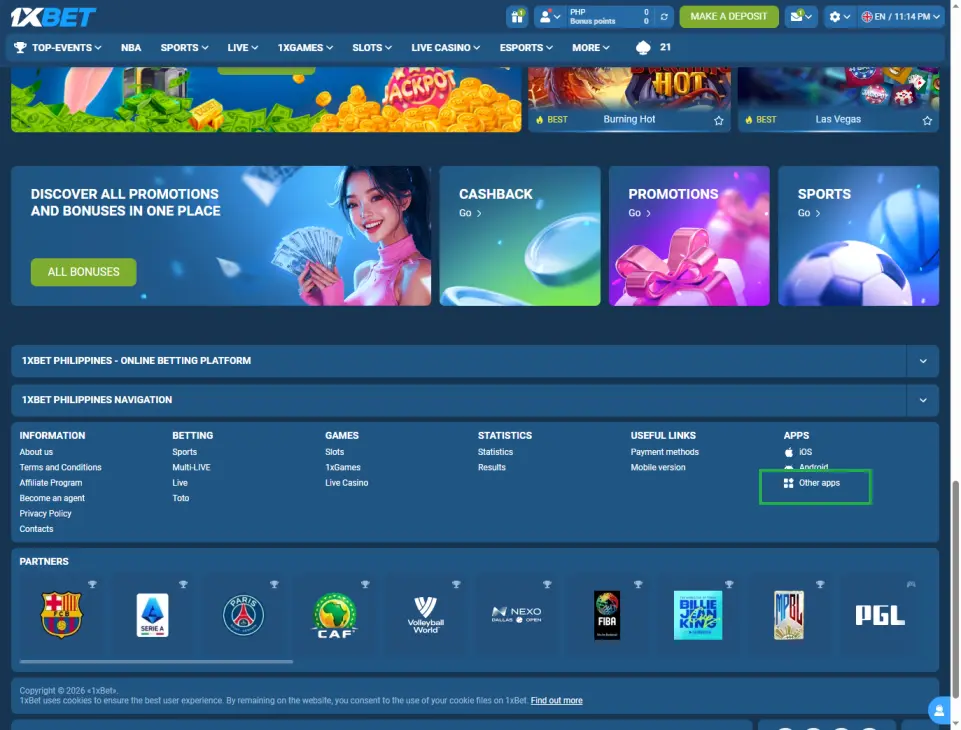
Open your browser and go to the official 1xBet website. Find “Other Apps” in the lower right corner of the page and click on it. (You can also click the button above.)
- Download 1xWin
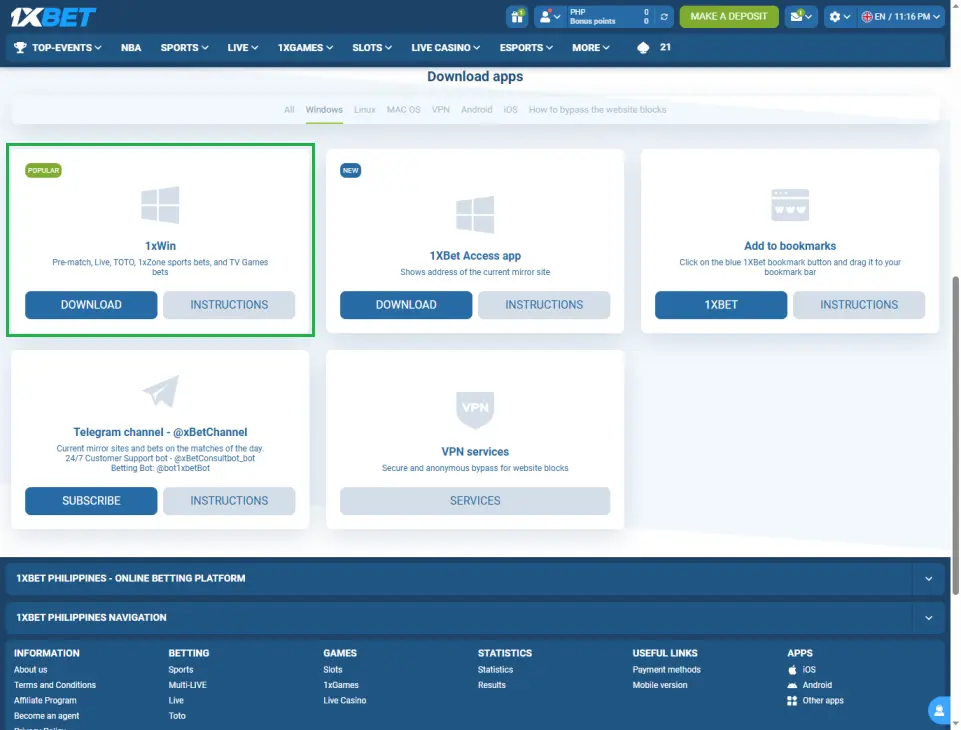
Select the Windows version, find “1xWin” and click “Download.” Choose the folder where you want to save the installer.
- Run the installer
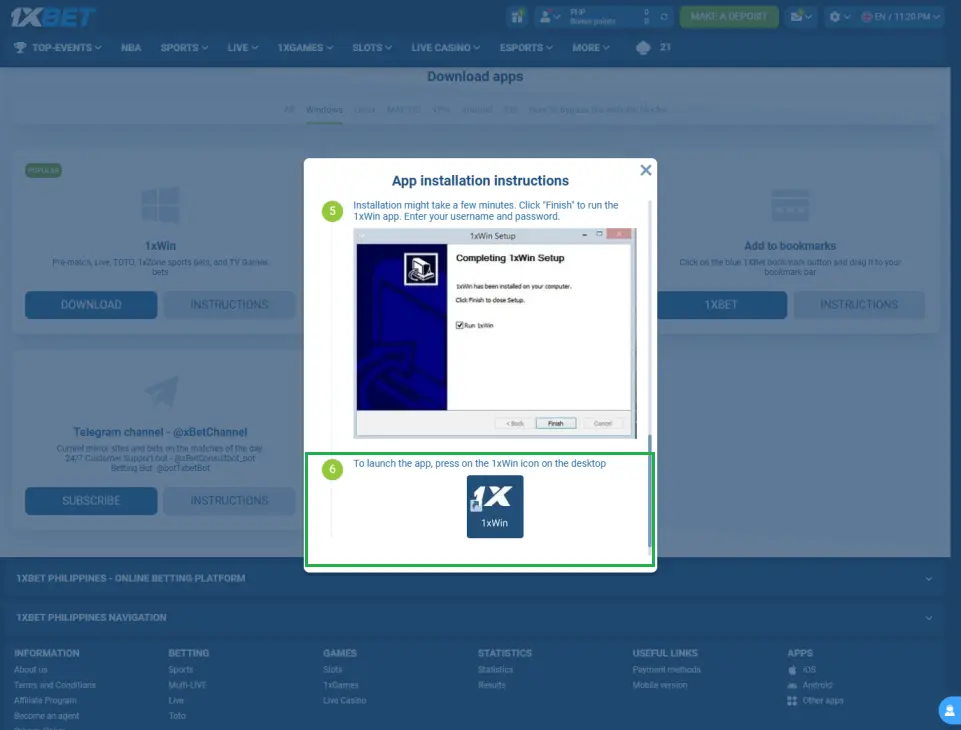
Once the download is complete, open the .exe installation file.
Follow the on-screen instructions. Make sure you have enough free space on your computer.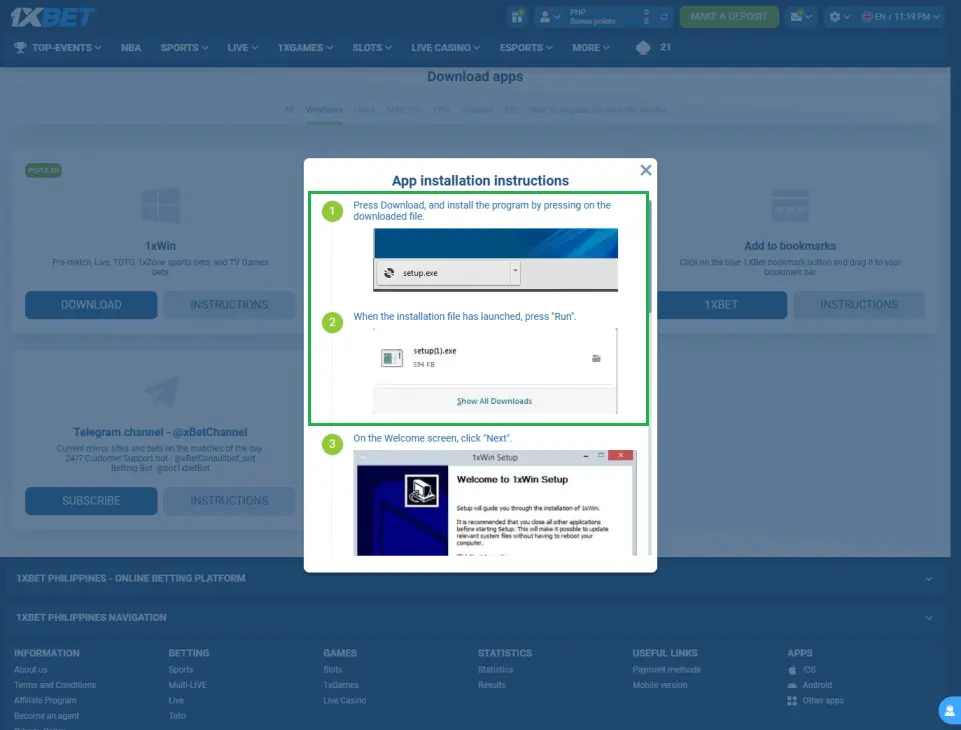
- Complete the installation
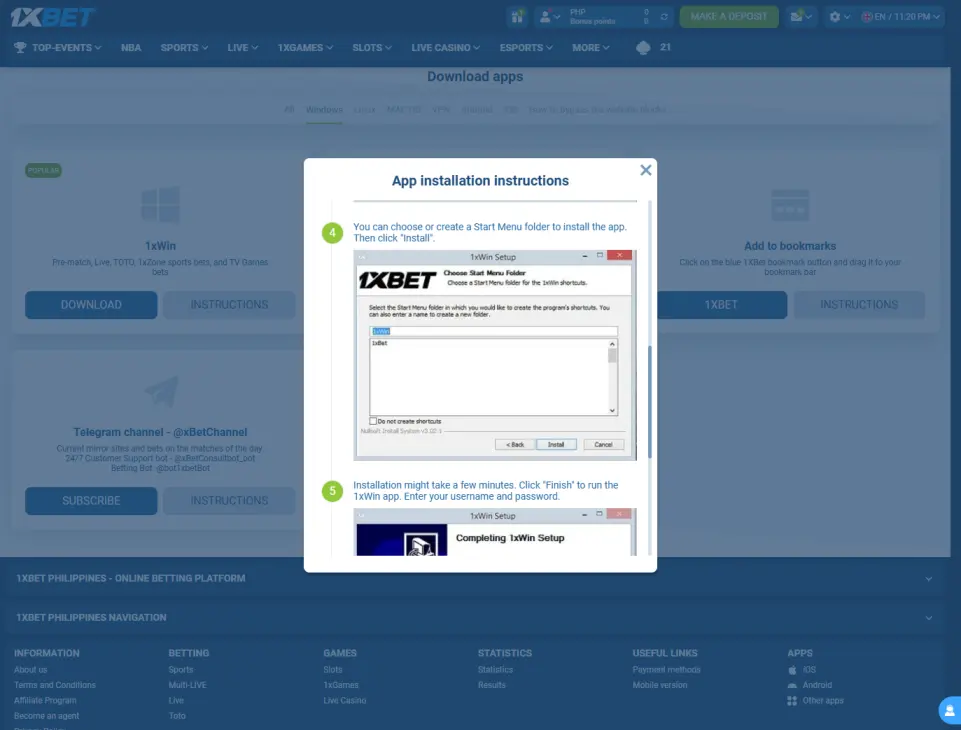
Click “Finish Installation” to finalize setup.
- Launch 1xBet
A 1xBet icon will appear on your desktop. Double-click it to open. Log in or register using your existing account or create a new one.
1xBet on PC: BlueStacks and Emulator Options
In addition to the native 1xWin Windows client, there is a popular alternative for PC users who prefer the mobile interface, running the 1xBet Android APK on PC using an Android emulator.
An emulator allows running the 1xBet Android app on desktop computers, giving users access to mobile interface on a larger screen. BlueStacks is the most widely used Android emulator for Windows. Its convenience is that it offers a larger screen experience for the mobile app interface, improving visibility of odds and betting options.
Step-by-Step: Install 1xBet on PC via BlueStacks
System Requirements for BlueStacks:
| Specification | Minimum |
|---|---|
| OS | Windows 7 / 8 / 10 / 11 (64-bit) |
| RAM | 4 GB (8 GB recommended) |
| Storage | 5 GB free disk space |
| Processor | Intel or AMD multi-core |
| Graphics | DirectX 11 / OpenGL 2.0 compatible GPU |
| Internet | Broadband connection |
Installation Steps:
- Download and Install BlueStacks on your PC
- Sign in to Google Play inside BlueStacks using a Google account (1xBet won’t be on Google Play)
- Download the 1xBet APK from the official 1xBet website on your PC browser and save the .apk file
- Install the APK in BlueStacks (drag and drop the .apk file or go to My Apps > Install APK and browse to the file).
- Launch 1xBet from the BlueStacks home screen. Log in or register. Use promo code 1x_3750778 when registering for a boosted welcome bonus
1xWin Native Client vs BlueStacks Emulator
An emulator enables mouse and keyboard controls for the mobile interface, combining desktop input with mobile design. Here’s how the two PC options compare:
| Feature | 1xWin (Native PC Client) | BlueStacks (Android Emulator) |
|---|---|---|
| Interface | Desktop-optimized | Mobile app interface on desktop |
| Installation | Simple .exe installer | Requires BlueStacks + APK |
| Performance | Lighter on system resources | Requires more RAM (4 GB+) |
| Updates | Manual from official site | Manual APK update |
| Screen Layout | Wide desktop layout | Mobile layout scaled up |
| Mobile Features | Standard desktop features | Full Android app features |
| Recommended For | Most PC users | Users who prefer mobile UI |
The 1xWin native client is the simpler and lighter option – install it directly from the official site with a single .exe file. BlueStacks is best suited for users who specifically prefer the 1xBet mobile app’s interface or want access to mobile-exclusive features not present in the Windows client.
Technical Requirements and Performance Optimization (PC)
1xWin System Requirements:
| Specification | Minimum |
|---|---|
| OS | Windows 7 / 8 / 10 / 11 |
| RAM | 4 GB |
| Free Storage | 500 MB |
| Internet | Broadband (5 Mbps+) |
| Browser (fallback) | Chrome, Firefox, Edge (latest) |
For live betting and casino streaming on PC, a stable broadband connection of at least 10 Mbps is recommended. Live dealer games stream real-time video and benefit most from a wired Ethernet connection rather than Wi-Fi for maximum stability.
Performance Tips for PC:
- Close unused browser tabs and background applications before starting live betting sessions.
- Keep your Windows OS and graphics drivers updated for smooth video streaming in live casino.
- Run a speed test before live dealer sessions – you need at least 5 Mbps stable download.
- Use a wired Ethernet connection for live dealer games where possible.
Sports Betting and Casino on 1xBet PC
The 1xWin PC client provides access to the full 1xBet sportsbook and 1xbet casino.
Sports Betting on PC
Sports betting is a primary feature of the 1xBet platform available in full on PC. The larger screen of a desktop computer makes it easier to track multiple live events simultaneously. Association football, basketball, esports, and tennis are among the most popular markets for PC users.
Esports at 1xBet is integrated as a major betting category on the 1xBet platform. Esports betting covers popular games like CS:GO, Dota 2, and League of Legends – all with comprehensive markets and tournament coverage.
Casino on PC:
- Slots – Microgaming is a pioneering software provider available on the 1xBet PH. Microgaming offers progressive jackpot games, including Mega Moolah.
- Live Dealer Games – Playtech provides high-quality live dealer games. The larger PC screen significantly enhances the live dealer experience (more table area, better card visibility, and clearer dealer interaction).
- Roulette – Available in multiple variations. The desktop interface makes placing complex multi-sector bets easier than on mobile.
- Blackjack, Baccarat, Poker – All available with full desktop-optimized layouts.
1xBet PC vs. Mobile App Comparison
| Feature | 1xWin PC Client | 1xBet Mobile App (Android/iOS) |
|---|---|---|
| Feature | 1xWin PC Client | 1xBet Mobile App (Android/iOS) |
| Screen Size | Large – easier multi-market viewing | Compact – designed for on-the-go |
| Input | Mouse + keyboard | Touchscreen |
| Portability | Desktop only | Anywhere with mobile data |
| Push Notifications | ❌ Desktop alerts only | ✅ Full push notifications |
| Live Dealer Quality | Best – larger screen, faster connection | Good – depends on mobile connection |
| Recommended For | Home use, serious bettors | On-the-go, casual bettors |
Payments via PC Client
All payment methods available on 1xBet mobile are also accessible via the PC client and website, including GCash (via browser redirect), Maya, Visa, Mastercard, online banking, and cryptocurrency. GCash enables quick deposits and withdrawals in PHP, processing within minutes.
Is 1xBet Legal on PC in the Philippines?
1xBet operates under Curacao eGaming License No. 1668/JAZ and is accessible to Filipino users via international regulation. The PC client functions under the same legal framework as the 1xBet mobile app (a legal gray area as 1xBet is not locally PAGCOR-licensed, but is accessible and used by Filipinos under international licensing).
Responsible Gaming on PC
All responsible gambling tools available on mobile are also accessible via the PC client and website:
- Deposit and loss limits
- Session time limits
- Reality checks
- Self-exclusion
- Full betting history
Access via My Account > Responsible Gaming on the 1xBet website or PC client.
Customer Support (PC)
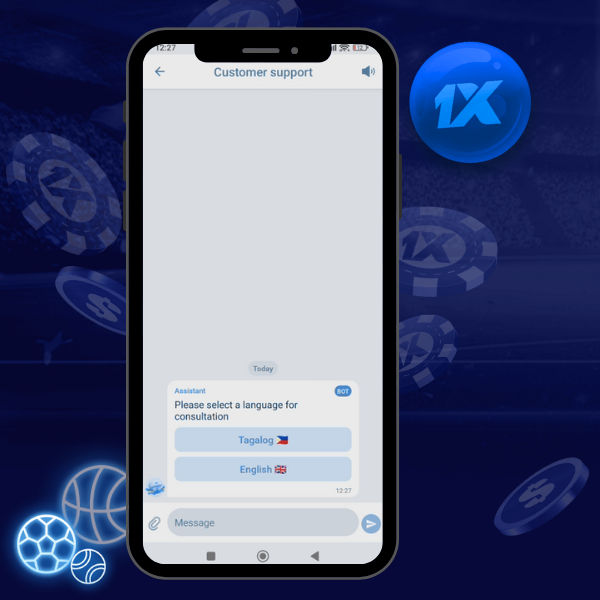
| Channel | Type | Availability |
|---|---|---|
| In-App Live Chat | Instant messaging | 24/7 |
| Email Support | Asynchronous | 24/7 |
| Telegram Bot | Instant messaging | 24/7 |
FAQ: 1xBet PC Client