
1xBet Payment Methods: How to Deposit



1xBet supports a range of local and international payment methods in the Philippines. The minimum deposit amount on the 1xBet Philippines website varies and depends on the payment method and, in some cases, on the terms of current bonuses. Processing times also differ for e-wallets, bank transfers, and credit-debit cards.
| Supported local methods | GCash, Maya, GrabPay, bank transfer, Visa and Mastercard |
| Minimum deposit | varies by method (starts from 50 PHP) |
| Processing time | typically instant for e-wallets, longer for bank transfers (3-5 days) |
| Fees | generally none charged by 1xBet, though your provider may apply charges |
| Currency | PHP accepted directly on most local payment methods |
For withdrawal details go to 1xBet Withdrawal Guide.
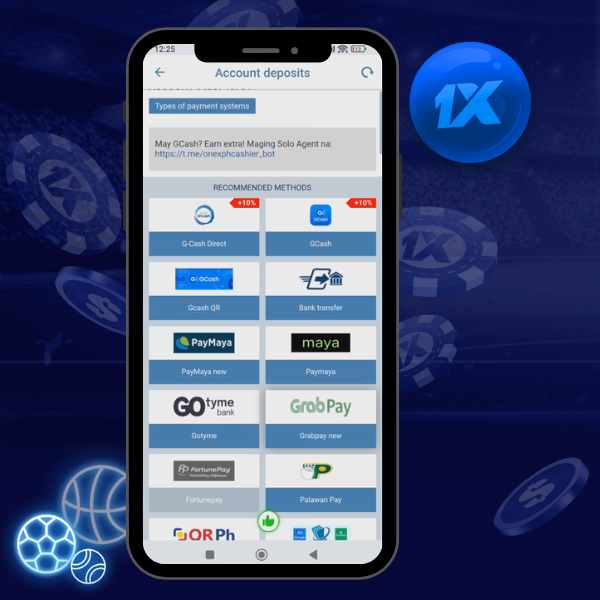
Limits may vary by payment method and active promo conditions.
Fastest Way to Deposit on 1xBet in the Philippines
For most Filipinos, GCash and Maya are the most convenient and familiar ways to top up their accounts. Both services are widely used and do not require a physical card. And since funds are credited almost instantly, you can avoid unnecessary stress.
| Method | Typical Use | Speed |
|---|---|---|
| GCash | Mobile wallet | Instant-5 min |
| Maya | Mobile wallet | Instant-5 min |
| Bank Transfer | Online banking | 15 min-24 hrs |
| Visa or Mastercard | Debit or credit card | Instant-15 min |
| Crypto | Bitcoin and others | 10-30 min |
The minimum amount displayed in the cashier may differ between these methods.
1xBet Payment Methods Available in the Philippines
1xBet organises its deposit options into several categories. The following sections cover each group relevant to Filipino users.
Local E-Wallets
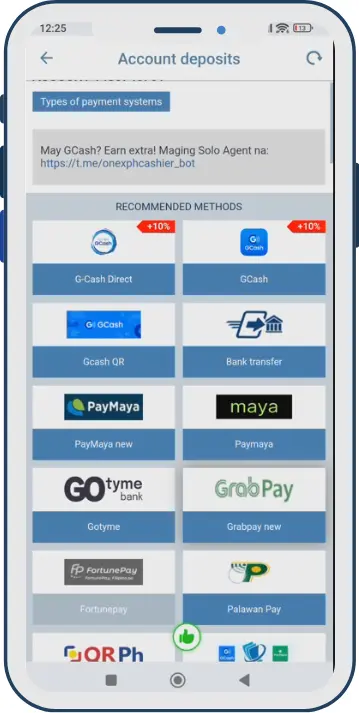
E-wallets are the most popular deposit route among Filipino bettors. They are mobile-first, require no bank card, and typically credit within minutes.
- GCash – the most widely used mobile wallet in the Philippines. Accepts PHP directly. Suitable for deposits of any size within wallet limits.
- Maya (formerly PayMaya) – full-featured digital bank and wallet. Supports fast deposits and is widely accepted on 1xBet PH.
- GrabPay – available on selected versions of the 1xBet cashier. Check availability at the time of deposit.

- Fastest – GCash, Maya
- Most Convenient – GCash, Maya (mobile app integration)
- Good for Beginners – GCash (most users already have an account)
Bank Transfer and Online Banking
Bank transfer is the standard method for users who need to deposit larger amounts. The largest Philippine banks (BDO, BPI, and UnionBank) are supported directly or through payment gateways such.
Processing times may vary. Transfers within the same bank are processed faster. Interbank transactions can take anywhere from a few hours to 1-3 business day.
- Higher Limits – Bank Transfer
Cards
Transactions made with Visa and Mastercard are processed within a few minutes; however, some banks implement additional verification measures for gambling transactions.
If your card transaction was declined, please contact your bank directly before trying again.
Cash and Over-the-Counter Options
The availability of payment channels through retail outlets (such as 7-Eleven or Bayad Center) may change over time. You can check the current status with 1xBet Philippines customer support.
Cryptocurrency
Cryptocurrency is available as an alternative for users accustomed to working with digital assets. The most commonly offered option is Bitcoin.
| Payment Method | Category | Deposit Speed | Typical Fee | Notes |
|---|---|---|---|---|
| GCash | E-Wallet | Instant-5 min | None (1xBet) | Most popular in PH |
| Maya | E-Wallet | Instant-5 min | None (1xBet) | Supports PHP |
| GrabPay | E-Wallet | Instant-5 min | None (1xBet) | Check availability |
| BDO / BPI / UnionBank | Bank Transfer | 15 min-24 hrs | Bank may charge | Good for larger amounts |
| Visa / Mastercard | Card | Instant-15 min | None (1xBet) | Bank may block gambling |
| Cryptocurrency | Crypto | 10-30 min | Network fee | Advanced users |
Last checked: March 2026.
What Is the Minimum Deposit on 1xBet in the Philippines?
Different sources quote different numbers. Understanding why requires separating three distinct concepts.
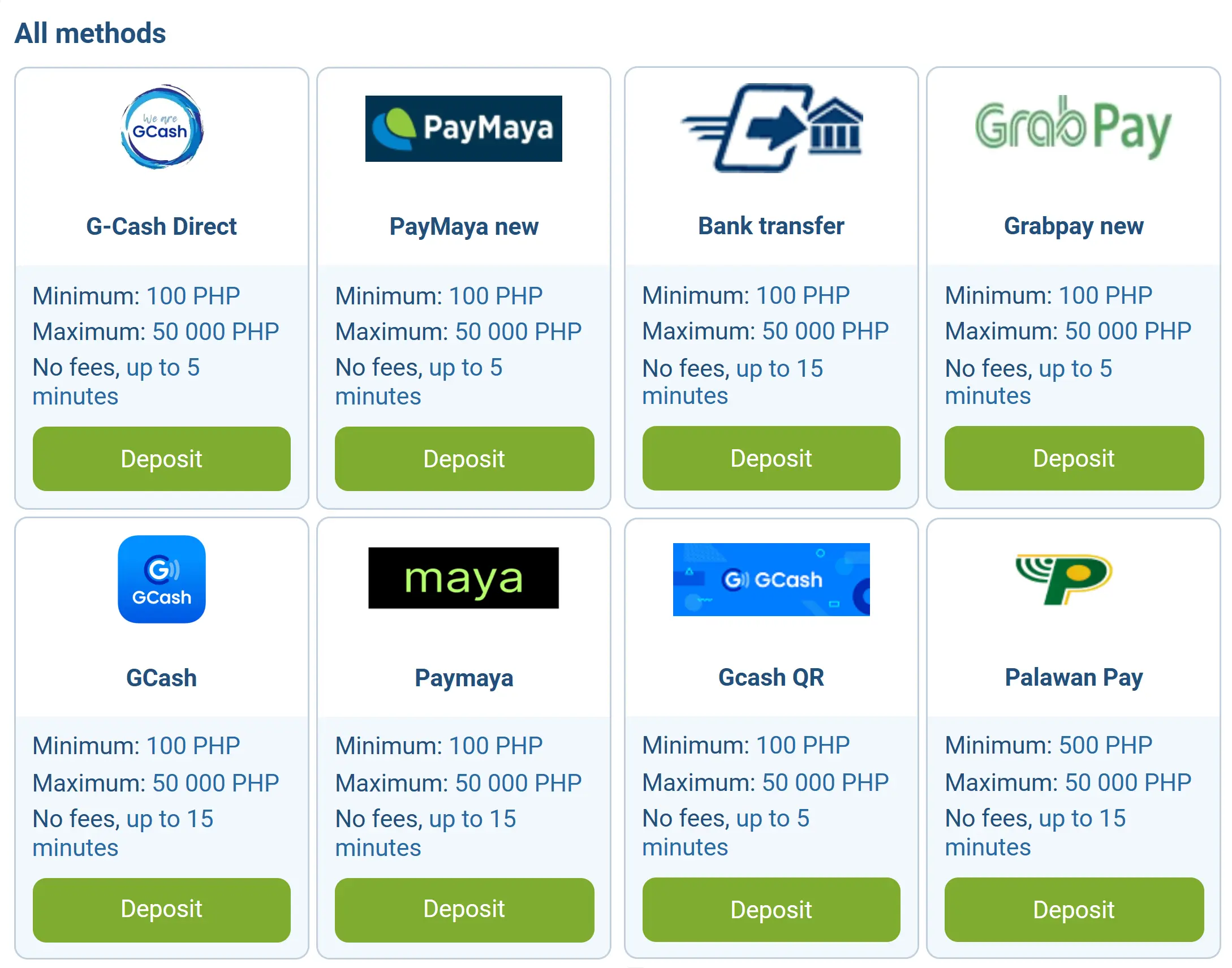
Why You May See Different Minimum Deposit Numbers Online
Three separate thresholds are often quoted as if they are the same figure:
- The minimum deposit required by a specific payment method
- The minimum deposit required to activate a welcome or reload bonus
- The general platform minimum for any transaction
These are not always equal. A method may accept ₱50, but a bonus may require ₱100 or more to trigger. Always read the bonus terms separately from the cashier minimum.
| Scenario | What It Means | Example Amount Shown on Some Pages |
|---|---|---|
| Method minimum | The smallest amount the payment provider accepts | Varies by method (e.g., ₱50-₱100) |
| Bonus minimum | The smallest deposit that activates a welcome offer | Often higher than method minimum |
| Practical minimum | Smallest amount for a smooth first deposit experience | Depends on method and bonus intent |
Published figures online (including those in this guide) reflect data available at the time of writing. Limits can change without notice.
1xBet Deposit Limits, Fees and Processing Times
1xBet does not typically charge a deposit fee. However, your bank, wallet provider, or card issuer may apply their own service charges. On processing: e-wallet deposits are generally described as instant or near-instant. This means the transaction completes within seconds to a few minutes under normal conditions. Delays can still occur See the troubleshooting section for causes.
| Method | Minimum Deposit | Maximum Deposit | Processing Time | Fees (1xBet) |
|---|---|---|---|---|
| GCash | Check cashier | Check cashier | Instant-5 min | None |
| Maya | Check cashier | Check cashier | Instant-5 min | None |
| GrabPay | Check cashier | Check cashier | Instant-5 min | None |
| Bank Transfer | Check cashier | Check cashier | 15 min-24 hrs | None |
| Visa / Mastercard | Check cashier | Check cashier | Instant-15 min | None |
| Cryptocurrency | Check cashier | Check cashier | 10-30 min | Network fee |
Check the cashier for current live limits before initiating any payment. Figures above are structural, exact PHP amounts are set by 1xBet and updated in the platform.
How to Deposit on 1xBet: Step-by-Step
The process for funding your account is the same whether you’re using a website with computer or the 1xBet mobile app. There may be subtle differences in the interface between app versions, but the steps remain the same.
- Log in to your 1xBet account. If you do not yet have an account, complete registration first.
- Open the Deposit (Cashier, Payments) section. On desktop, this is typically accessible from the top-right account menu. On the 1xBet app, look for the wallet or deposit icon.
- Select a payment method. Choose from the available options. Local methods (GCash, Maya) are usually listed prominently for Philippine users.
- Enter the deposit amount in PHP. The minimum and maximum for that method will be displayed. Do not enter an amount below the stated minimum.
- Enter the required details. Depending on the method, this may be your GCash mobile number, Maya account number, card details, or bank reference.
- Confirm the payment. This step typically redirects you to your wallet app or banking portal for final authorisation. Complete the confirmation there.
- Check your balance. Return to 1xBet and verify that the funds appear in your main account balance. Under normal conditions, this happens immediately after confirmation.
If your deposit is in a “pending” status, do not repeat the transaction. Wait for the current one to resolve first. See the troubleshooting section for next steps.
How to Top Up 1xBet With the Most Popular Local Methods
How to Deposit With GCash
You need an active, verified GCash account with sufficient balance and a registered mobile number.
- Open the Deposit section
Log in to 1xBet and open the Deposit section
- Choose GCash
Select GCash from the payment method list
- Enter the amount in PHP
You will be redirected to the GCash payment portal or prompted to enter your GCash-linked mobile number.
- Approve the transaction
Approve the transaction in the GCash app using your MPIN
- Return to 1xBet
The balance should update within minutes.
💡 Best for small and medium deposits. Fast and widely supported.
How to Deposit With Maya
You need a verified Maya account, sufficient balance, and your registered Maya mobile number or account credentials.
- Log in to 1xBet and open the Deposit section.
- Select Maya from the payment options.
- Enter the deposit amount.
- Follow the redirect to Maya’s payment page or enter your account number as prompted.
- Authorise the transaction inside the Maya app.
- Confirm the balance update in your 1xBet account.
💡 Best for app users and those who use Maya as their primary digital bank.
How to Deposit via Online Banking / Bank Transfer
You need an active BDO, BPI, UnionBank, or other supported bank account with online banking access.
- Select the bank transfer option in the 1xBet cashier.
- Choose your bank from the list.
- Enter the amount and follow the instructions provided, these may include a reference number or specific account details.
- Log in to your bank’s app or online portal and complete the transfer using the provided details.
- Keep the transaction reference number.
- Wait for the processing window, bank transfers can take from 15 minutes to 24 hours.
💡 Good for larger deposit amounts. Always save the transaction receipt.
How to Deposit from the Mobile App
The 1xBet app completely replicates the desktop checkout interface. Open the app, tap the “Deposit” or “Wallet” icon, select your preferred payment method, enter the amount, and confirm the transaction via your wallet or banking app. The app supports all the same payment methods as the desktop version.
💡 The 1xBet app is the most convenient route for GCash and Maya users on mobile.
Your 1xBet Balance After a Deposit
A completed payment on the GCash or Maya side does not always mean funds appear in your 1xBet account at exactly the same moment. Understanding balance types helps you interpret what you see.
Balance types on 1xBet:
| Balance Type | What It Is | Can It Be Used or Withdrawn? |
|---|---|---|
| Balance Type | What It Is | Can It Be Used or Withdrawn? |
| Main Balance / Cash Balance | Real money deposited or won | Yes. available for betting and withdrawal |
| Bonus Balance / Promo Balance | Funds credited from promotions | Subject to wagering requirements before withdrawal |
| Pending Transaction | Payment initiated but not yet confirmed | Not available until confirmed |
How the process works:
Wallet / Bank → Payment Confirmation → 1xBet Main Balance
After payment confirmation on the provider side, 1xBet receives a notification and credits your main balance. This normally takes seconds to a few minutes for e-wallets.
If the main balance does not update after the expected window, check the transaction history inside the 1xBet account before taking any action.
To view transaction history go to your account menu → My Account or Transaction History → Deposits. This log shows the status of each transaction.
Common 1xBet Deposit Problems in the Philippines
Most deposit issues have a specific cause and a clear first action. The troubleshooting matrix below covers the most frequent scenarios for Philippine users.
| Problem | Likely Reason | What to Do Now |
|---|---|---|
| Deposit rejected | Card or wallet blocked for gambling, insufficient balance, incorrect details | Check balance, verify details, contact card issuer if blocked |
| Deposit pending | Bank (wallet) processing delay, high traffic volume | Wait the normal processing window for that method; do not retry |
| Money deducted but not credited | Transaction confirmed by wallet but not yet processed by 1xBet | Wait 15-30 minutes, then check transaction history |
| Wrong number or reference entered | Typo in wallet number, phone number, or reference field | Do not retry immediately – contact support with proof of payment |
| Insufficient wallet balance | GCash/Maya balance too low | Top up the wallet first, then return to the cashier |
| Unverified wallet or account | KYC not completed on GCash/Maya or 1xBet | Complete identity verification on the relevant platform |
| Payment method temporarily unavailable | Maintenance on the provider’s system | Try an alternative method or wait and retry later |
| Banking app timeout | Session expired during the redirect | Check wallet/bank for transaction status before retrying |
| Balance not updating in the app | App cache not refreshed | Close and reopen the app; check transaction history |
Do not repeat the payment if the first transaction is shown as “pending.” Sending the same amount twice may result in a double charge, which will require manual resolution through customer support.
What to Do if Your Deposit Is Not Credited
If funds were deducted from your wallet or bank but have not appeared in your 1xBet balance, follow this sequence before contacting 1xBet support.
Action checklist:
- Check the transaction status in your GCash, Maya, or bank app
- Confirm the transaction is marked as completed (not failed or pending) on the provider side
- Wait the normal processing window for the method used (instant for e-wallets; up to 24 hours for bank transfers)
- Review the details you entered – wallet number, amount, reference
- Refresh the 1xBet app and check the account balance and transaction history
- Screenshot or save proof of the completed payment: transaction ID, amount, date and time, sending account
What to prepare before contacting 1xBet support:
- Transaction ID or reference number
- Amount deposited (in PHP)
- Date and exact time of the transaction
- Payment method used
- Screenshot of the completed transaction from your wallet or bank app
When to contact customer support: if 24 hours have passed since the merchant confirmed the transaction and your balance has not been updated.documentation. Live chat support is available on the 1xBet platform and is generally the fastest route for deposit queries.
FAQ